
Oracle Database 12c SQL
作者寄语:This book is dedicated to my family.Even though you’re far away, you are still in my heart.
About the Author: Jason Price is a freelance consultant and former product manager of Oracle Corporation. He has contributed to many of Oracle’s products
10 User Priviledges and Roles
- create users
- See how privileges enable users to access data and perform database tasks
- Explore the two types of privileges: system privileges and object privileges
- Learn how system privileges enable actions such as executing DDL statements
- See how object privileges enable actions such as executing DML statements
- Group privileges together into roles
- Audit the execution of SQL statements
tablespace Tablespaces are stored in datafiles , which are files stored in the file system of a database server. A datafile stores data for one tablespace The Oracle database software creates a datafile for a tablespace by allocating the specified amount of disk space plus the overhead for a file header ,including tables , types ,PLSQL code
10.1 User
10.1.1 Create a User
CREATE USER user_name IDENTIFIED BY password
[ DEFAULT TABLESPACE default_tablespace ]
[ TEMPOARY TABLESPACE tempoary_tablespace ];
user_name is name of database userpassword is the password for the database userdefault_tablespace If you omit a default tablespace, the default SYSTEM tablespace, which always exists in a database, is usedtempoary_tablespace include temporary tables If you omit a temporary tablespace, the default SYSTEM tablespace is used
so the example as below
CREATE USER jason IDENTIFIED by priceand grant user basic privileges like create session
grant create session to jason;here have so many extend privileges
10.1.2 change password
ALTER USER jason IDENTIFIED BY marcus
---or another way
CONNECT jason/marcus PASSWORD
10.1.3 delete user
drop user jason10.2 System privileges
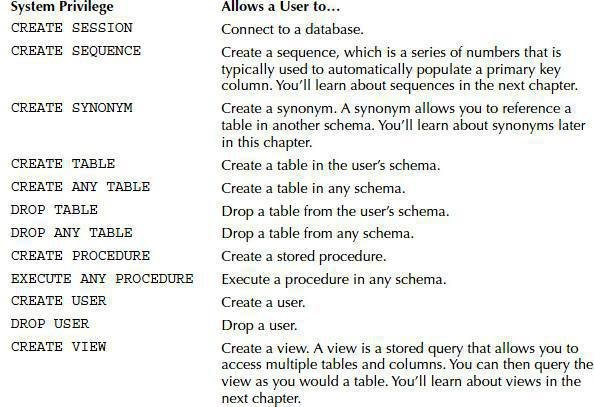
for all the reference ,please refer oracle published manual
10.2.1 grant system privileges to a user
connect system/oracle
GRANT CREATE SEESON,CREATE USER,CREATE TABLE to steve
You can also use WITH ADMIN OPTION to allow a user to grant a privilege to another user.
grant execute any procedure to steve wth admin optionEXECUTE ANY PROCEDURE can then be granted to another user by steve .The following example connects as steve and grants EXECUTE ANY PROCEDURE to gail :
connect steve/brown
grant execute any procedure to gail
You can grant a privilege to all users by granting to PUBLIC
connect system/oracle
grant execute any procedure to public
10.2.2 Checking System Privileges Granted to a User
data dictionary stores information about the database itself.
table user_sys_privs stores current user privileges that it has
usernameindicates current user,privilegesindicates that user owned privileges,admin_optionindicate whether the user is able to grant privileges to another user.
if steve had create user privileges , so he could create user.connect steve/brown create user roy IDENTIFIED by red;
10.2.3 Revoking System Privileges from a User
you could also revoke user privileges bby below sql.
connect system/oracle
revoke create table from steve
if you want revoke user execute procedure
revoke execute any procedure fron steve10.3 Object Privileges
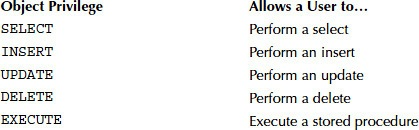
10.3.1 Granting Object Privileges to a User
connect store/store_password
grant select , insert , update on store.products to steve
or narrow table privileges for certainly columns.
grant update (last_name,salary) on store.employees to stevenote: You use the GRANT option to allow a user to grant an object privilege to another user, and you use the ADMIN option to allow a user to grant a system privilege to another user.
grant select on store.customers to steve with grant option;connect as steve to grant privileges to gail
connect steve/brown
grant select on store.customers to gail;
10.3.2 check object privileges made
table user_tab_privs_mad could get all object privileges made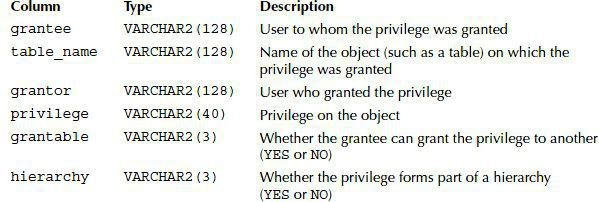
select * from user_tab_privs_mad where table_name = 'products'You can check which column object privileges a user has made by queryinguser_col_privs_made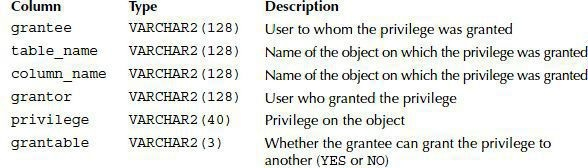
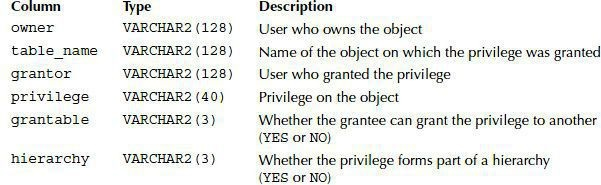
You can check which object privileges on a table a user has received by
querying the user_tab_privs_recd table
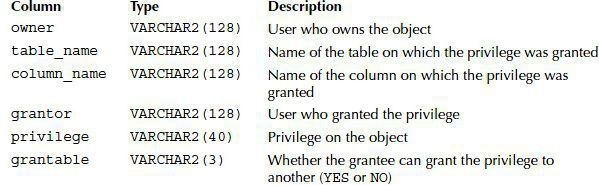
You can check which column object privileges a user has received by
querying user_col_privs_recd
when we got corresponding privileges you can do statement by below with schema ahead of table name
DBA_SYS_PRIVS:      查询某个用户所拥有的系统权限

USER_SYS_PRIVS:     当前用户所拥有的系统权限

SESSION_PRIVS:      当前用户所拥有的全部权限

ROLE_SYS_PRIVS:     某个角色所拥有的系统权限

注意: 要以SYS用户登陆查询这个视图,否则返回空.

ROLE_ROLE_PRIVS:    当前角色被赋予的角色

SESSION_ROLES:      当前用户被激活的角色

USER_ROLE_PRIVS:    当前用户被授予的角色

另外还有针对表的访问权限的视图:

TABLE_PRIVILEGES

ALL_TAB_PRIVS

ROLE_TAB_PRIVS:     某个角色被赋予的相关表的权限
-----------------------------------
©著作权归作者所有:来自51CTO博客作者day_day_up_cium的原创作品,请联系作者获取转载授权,否则将追究法律责任
Oracle中用户角色权限管理
https://blog.51cto.com/lwc0329/3000521
10.3.3 creating synonyms
across schemas you want query data , then you could use synonym to connect schema.
--1.
connect system/oracle
grant create synonym to steve
--2.
connect steve/brown
create synonym customers for store.customers
--3. login user steve
select * from customer
10.3.4 Creating Public Synonyms
You can also create a public synonym for a table. When you do this, all the users see the synonym. this is key
connect system/oracle
grant create public synonym to store
connect store/store_possword
grant public synonym products for store.products;
-- now you can connect as steve and retrive rows from store.products
connect steve
select * from products;
there is another question need to be claimed,even you had created public synonym , but you still need to grant privileges. for example
-- gail can see store public synonym ,but jail do not have objects privileges on `store.products` table
connect gail
grant select to store
connect system/oracle
grant create public synonym to store
connect store/store_possword
grant public synonym products for store.products;
-- now you can connect as steve and retrive rows from store.products
connect gail
select * from products;
If a user has other object privileges, that user can exercise those object privileges through a synonym. For example, if gail had the INSERT object privilege on the store.products table, then gail would be able to add a row to store.products through the products synonym.
10.3.5 revoke object privileges
revoke store.products INSERT privileges
connect store/store_password
revoke insert on products from steve;
revoke somebody select privileges for some one of schema
connect store/store_password
revoke select on store.customers from steve;
10.4 Roles
A role is a group of privileges that you can assign to a user or to another role.The following points summarize the benefits of roles:
- Rather than assigning privileges one at a time directly to a user, you can create a role, assign privileges to that role, and then grant that role to multiple users and roles.
- When you add or delete a privilege from a role, all users and roles assigned that role automatically receive or lose that privileg
- You can assign multiple roles to a user or role
- You can assign a password to a role.
10.4.1 create roles
baisc , if you want create role , also you need get right, more like below
connect system/oracle
grant create role to store
grant create user to store with admin option
--login user store

connect store/store_password
grant create role product_manager;
grant create role hr_manager;
grant create role overall_manager IDENTIFIED by manager_password;
10.4.2 grant privileges to roles
system -> role
            |
object -> role -> role

grant select ,insert,update,delete on product_types to product_manager;
grant select ,insert,update,delete on products to product_manager;
grant select ,insert,update,delete on salary_grades to hr_manager;
grant select ,insert,update,delete on employees to hr_manager;
grant create,user to hr_manager;
grant product_manager,hr_manager to overall_manager;
10.4.3 Granting Roles to a User
general procedure to create user and assign right
connect system/oracle
grant user john IDENTIFIED by brown;
grant user harry IDENTIFIED by blue;
grant create session to john;
grant create session to harry;
now you can use current good way
grant hr_manager to john;
grant overall_manager to harry;
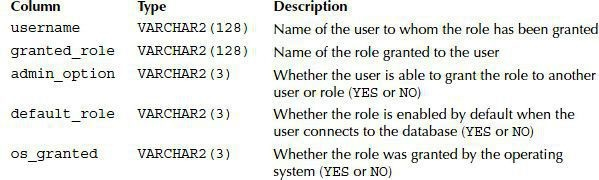
10.4.4 Checking Roles Granted to a User
table user_role_privs is the key
This role is password protected. Before the user can use the role, the user must enter the role password.
10.4.5 Checking System Privileges Granted to a Role
table role_sys_privs is the key

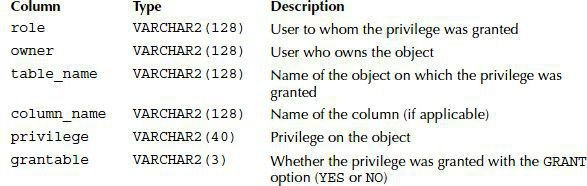
10.4.6 Checking Object Privileges Granted to a Role
table role_tab_privs is the key
10.4.7 Making Use of Privileges Granted to a Role
For a non-password-protected role, the user can immediately use the privileges assigned to the role when they connect to the database
connect john/brown
select employee_id , last_name from store.amployees where salary<any ( select low_salary from store_grades order by employee_id)
For example, the harry user has the password-protected overall_manager role. Before harry is able to use the overall_manager role, he must enable the role and provide the role password using the SET ROLE command
connect harry/blue
set role overall_manager IDENTIFIED by manager_password;
Then, harry can use the privileges granted to the role. For example:
10.4.8 Enabling and Disabling Roles
connect system/oracle
-- disable
alter user john default role all except hr_manager;
--enable
set role hr_manager;
-- set default role
connect system/oracle
alter user john default role hr_manager;
-- set none for role
connect john/brown
set role NONE;
-- sets the role to all roles except hr_manager
set role all except hr_manager;
10.4.9 Revoking a Role and Privileges and drop a role
-- Revoking a Role
connect store/store_password
revoke overall_manager from harry;
-- revoke Privileges
connect store/store_password
revoke all on products from product_manager;
revoke all on product_types from product_manager;
-- drop role
connect store/store_password
drop role overall_manager;
drop role product_manager;
drop role hr_manager;
12.Creating Tables, Sequences, Indexes, and Views
In this chapter, you will learn how to perform the following tasks:
- Create,modify, and drop tables
- Create and use sequences, which generate a series of numbers
- Create and use indexes,which can improve the performance of queries
- Create and use views, which are predefined(adj.[计]预先定义的) queries
- Examine flashback data archives,which store row changes made over a period of time
12.1 Tables
purpose: In this section,you’ll learn about creating a table. You’ll see how to modify and drop a table as well as how to retrieve information about a table from the data dictionary. The data dictionary contains information about all the database items such as tables sequences, indexes, and so on.
12.1.1 Creating a Table
CREATE [GLOBALTEMPORARY] TABLE table_name (
    column_name     type [CONSTRAINT constraint_def DEFAULT default_exp]
    [, column_name  type [CONSTRAINT constraint_def DEFAULT default_exp] ...] )

    [ON COMMIT { DELETE | PRESERVE} ROWS ]
TABLESPACE tab_space;
GLOBAL TEMPORARYspecifies that the table’s rows are temporary (this type of table is known as a temporary table). The rows in a temporary table are specific to a user session, and how long the rows persist is set using the ONCOMMITclause.table nameis the name of the table.column nameis the name of a column.typeis the type of a column.constraint_defis a constraint on a column.ON COMMITcontrols the duration of the rows in a temporary table.DELETEspecifies that the rows are deleted at the end of a transaction.PRESERVEspecifies that the rows are kept until the end of a user session,at which point the rows are deleted. If you omitON COMMITfor a temporary table, then the default ofDELETEis used.tab_spaceis the tablespace for the table. If you omit a tablespace,then the table is stored in the user’s default tablespace.
or using another clause
CONNECT store/store_password CREATE TABLE order_status2(
    id INTEGER CONSTRAINT order_statue2_pk PRIMARY KEY,
    status VARCHAR2(10),
    last_modified DATE DEFAULT SYSDATE
) ;
creating a temporary table:
CREATE GLORAL TEMPORARY TABLE order_status_temp (
id INTBGER,
status VARCHAR2(10) ,
last_modified DATE DEPAULT SYSDATE
ON COMMIT PRESERVE ROWS;
temporary table performs the following tasks:
- Adds a row to order_status_temp
- Disconnects from the database to end the session row in
order_status_tempto be deleted - Reconnects as
storeaccount and queries order_status_temp , which shows there are no rows in this table
12.1.2 Getting Information on Tables
- Running a
DESCRIBEcommand for the table(desc table_name) - Querying the
user_tablesview, which forms part of the data dictionary
# Some Columns in the `user_tables` View
Column              lype                Description
table_name          VARCHAR2 (128)      Name of the table.
tablespace_name     VARCHAR2(30)        Name of the tablespace in which the table isstored.A tablespace is an area used by thedatabase to store objects such as tables.
temporary           VARCHAR2(1)         Whether the table is temporary. This is set toY if temporary or N if not temporary.
select * from user_tables会查到相关用户的信息
Notice: the order_status_temp table is temporary, as indicated by the Y in the last column.You can retrieve information on all the tables you have access to by querying the all_tables view
12.1.3 Getting Information on Columns in Tables
You can retrieve information about the columns in a table from the user_tab_columns view. Table 11-2 describes some of the columns in user_tab_columns
Column              Type                Description
table_name          VARCHAR2(128)       Name of the table
column_name         VARCHAR2(128)       Name of the column
data_type           VARCHAR2 (128)      Data type of the column
data_length         NUMBER              Length of the data
data _precision     NUMBER              Precision of a numeric columnif a precision was specified
data_scale          NUMBER              Scale of a numeric column
The following example queries user_tab_columns for the products table:
COLUMN colunn_nane FORMAT a15
COLUMN data_type FORMAT a10
SELECT column_name, data_type, data_length,data_precision,data_s FROM uaer_tab_columns WHERE table_name = 'PRODUCTs';
COLUMN_NAME     DATA_TYPE       DATA_LENGTH     DATA_PRECISION      DATA_SCALE
PRODUcTID       NUMBER          22                                  0
PRODUCT_TYPEID  NUMBER          22                                  0
NAME            VARCHAR2        30
DESCRIPTION     VARCHAR2        50
PRICE           NUMEER          22              5                   2
note:You can retrieve information on all the columns in tables you have access to by querying the all_tab_columns view
12.1.4 Altering a Table
You alter a table using the ALTER TABLE statement. You can use ALTER TABLE
to perform tasks such as the following:
- Adding, modifying, or dropping a column
- Adding or dropping a constraint
- Enabling or disabling a constraint
In the following sections, you’ll learn how to use ALTER TABLE to perform each of these tasks. You’ll also learn how to obtain information about constraints.
Adding a Column
The following example uses ALTER TABLE to add an INTEGER column named modified by to the order_status2 table:
alter table order_status2
add modified_by INTEGER
The next example adds a column named initially_created to order_status2 :
alter table order_status2
add initially_created date default sysdate not null;
You can verify the addition of the new column by running a DESCRIBE command on order_status2 :
describe order_status2;
Adding a Virtual Column
Oracle Database 11g introduced virtual columns. A virtual column is a column that refers only to other columns already in the table. For example,the following ALTER TABLE statement adds a virtual column named average_salary to the salary_grades table:
alter table salary_grades add (average_salary as ( (low_salary + high_salary)/2 ));